News

[Transcendent Classes]
Skill Add-ons Overview
Shortcuts
Skill Add-ons Preview
Weapon Passives & Skill Setup
How to Obtain Skill Sigils
How to Equip Skill Sigils
※ 한국어 공지는 아래의 링크를 통해 확인하실 수 있습니다.
바로가기
Equip powerful effects to your skills
and build a combat style of your own!
Skill Add-ons are now available on the test server.
Equip Sigils to your skills and customize them with a variety of powerful effects.
Increase attack range, gain additional skill uses, hit more targets, and more.
Visit the test server now!
Skill Add-ons Preview
Skill Add-ons, which grant powerful effects to your skills
can be applied by equipping Skill Sigils to your skill.
Here's a showcase of some skills with the add-ons
as a preview, and to help you during your gameplay.
※ Each skill has different Skill Sigils that can be equipped.
[Radiant Skill Sigil: Increase Skill Charge]
| Unequipped | Equipped |


[Radiant Skill Sigil: Change to an Instant Activation Skill]
| Unequipped | Equipped |


| Unequipped | Equipped |


[Guardian Skill Sigil: Apply Forward Guard, Super Armor]
| Unequipped | Equipped |


[Guardian Skill Sigil: Grab Immunity]
| Unequipped | Equipped |


Weapon Passives & Skill Setup
Before setting up your Skill Add-ons,
choose your weapon passive and skill setup.

You can select one weapon in [Menu] > [Skill] > [Select Weapon].

Each weapon provides different passive effects that influence your skills.
View skill details in [Menu] > [Skill] > [Equip Skill].
Select and equip skills to your skill slots.

Use Auto-Equip to fill your skill slots with recommended skills.
View skill combos in [Menu] > [Skill] > [Skill Combos].
ㆍTap a skill to view only its related combos.


How to Obtain Skill Sigils
Equip Sigils to your skills to unlock additional effects.
* The method shown above is for the test server only.
Skill Sigils may be obtained differently on the live server.
Visit Eileen in Velia to purchase Skill Sigils.

Visit an Appraiser NPC in town and appraise your Skill Sigils.

* Use the "Find Appraiser" button in the Skill Sigil item information window to auto-move to an Appraiser NPC.
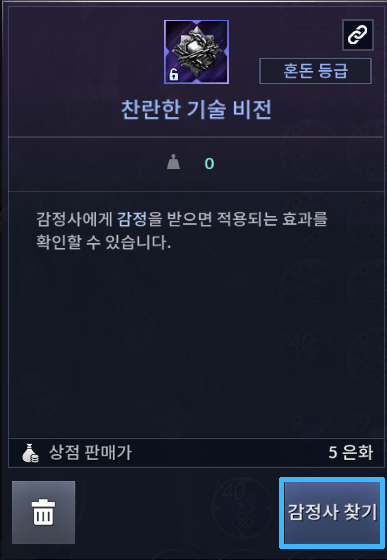
You can check the effect of the appraised Skill Sigil.

[Sigil Effects]
How to Equip Skill Sigils
Choose your desired skill in [Menu] > [Skill] > [Skill Upgrade/Add-on].

Choose the Skill Sigil you want.

Up to 4 Sigils can be equipped to a single skill,
and each skill has designated sigils that can be equipped.
(※ Each skill has different Skill Sigil that can be equipped.)
Select the Sigil you want, then tap "Load" to move it to the "Sigil Chest."

Select a Sigil from the Sigil Chest, then tap "Equip Sigil."

※ Different Branch types (Aal/Serrett/Ahib/Labreve) can be equipped in combination across all skills.
However, only up to 4 Sigils of the same Branch type can be equipped.
※ Sigils cannot be equipped to basic skills.
(E.g., Dosa: Taehak Way of Hwando, Tamer: Leaf Dance)
Equipped!

* Level skills by using Skillbook Chests and Transcendent Skillbook Chests in your inventory,
then pressing "Use All Skillbooks" in [Menu > Skills > Skill Upgrade/Add-on].
Also check this out!
Share Your Thoughts!Share Your Thoughts!
Give us your feedback on
Skill Add-ons and Transcendent Classes!
Everyone who participates
will get a Transcendence Starter Pack!
Thank you.